Solution

SURRO DrawAX

Overview AI-Powered Drawing Search & Review Automation

Turn your scanned drawings into structured, searchable data — equipment, piping, and the connections between them, ready for everyday work.

Current Drawing Challenges
Drawing Usability Limits
Drawing Search

Finding drawings depends on folders and file names.

Revision Check

The latest version is verified manually, every time.

Review Standard Limits
Change Comparison

Revisions are compared side by side, by eye.

Criteria Variability

Review criteria vary by engineer.

SURRO DrawAX
AI Recognition & Search

Search objects, relationships, and text from AI-recognized drawing data.

Revision Control

Groups revisions of the same drawing and flags the latest.

Change Review

Highlights changed areas and shares comments on the drawing.

Rule Check & Export

Runs your in-house rules and exports lists.
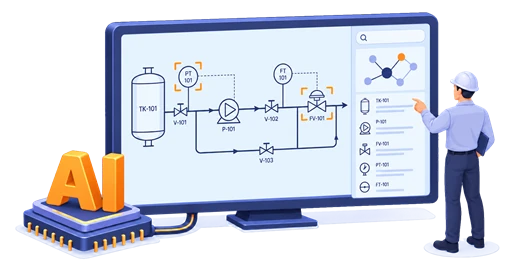
How it Works Drawings into data, inspection into automation

SURRO DrawAX converts image-based drawings into object and connectivity data, then inspects every new drawing against your registered rules.

1
Register
Upload PDF and scanned drawings
in their original form.
2
Recognize
AI detects symbols, text,
and piping lines.
3
Structure
Saves recognized objects
and their connections as data.
4
Define
Turn your review criteria
into reusable rules.
5
Inspect
Checks every new drawing
against the registered rules.
Schematic Three layers,
one connected drawing-AI architecture

SURRO DrawAX is built on the Application, AI / Graph, and Data Layers to manage drawing originals,
AI outputs, and work history in one place.
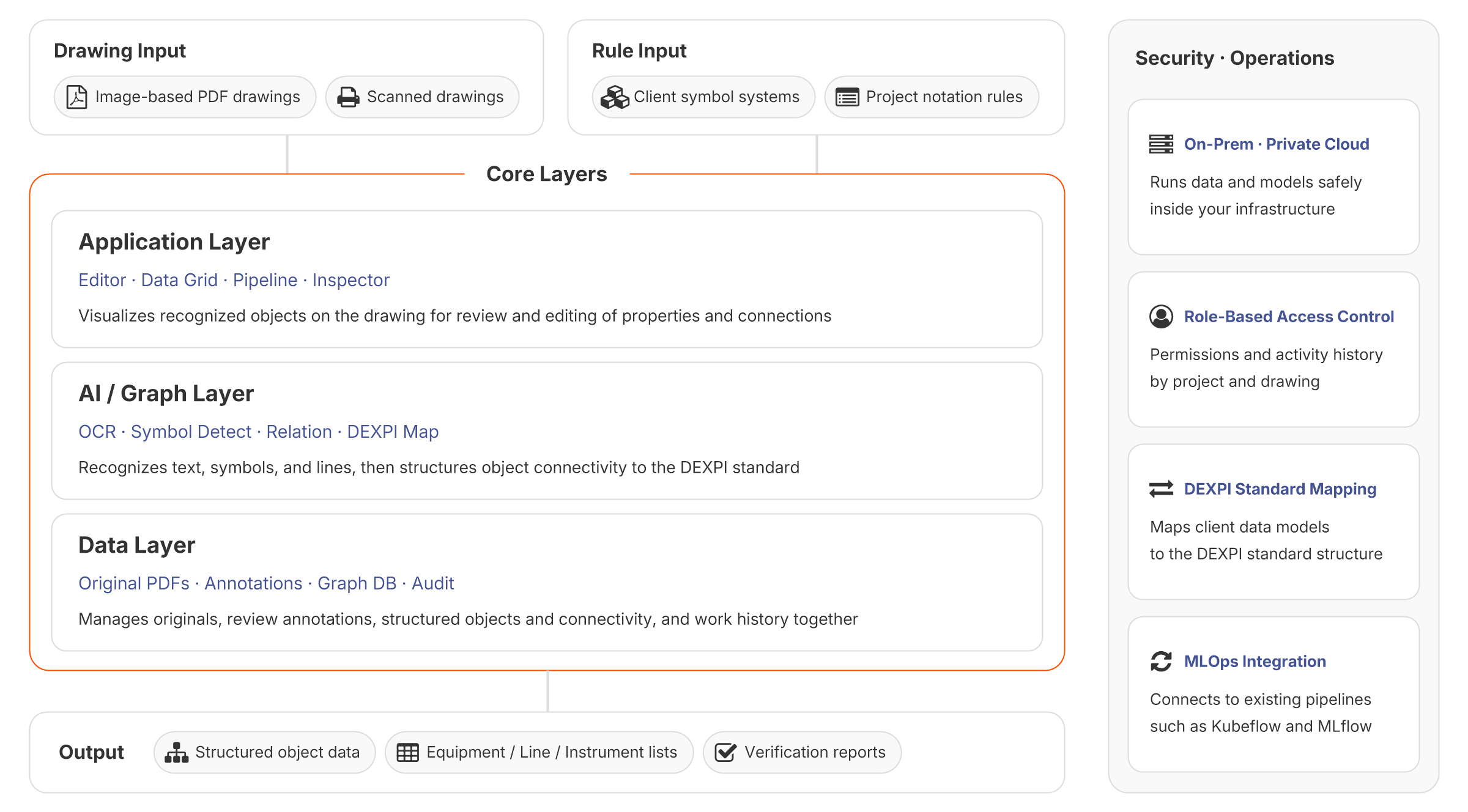
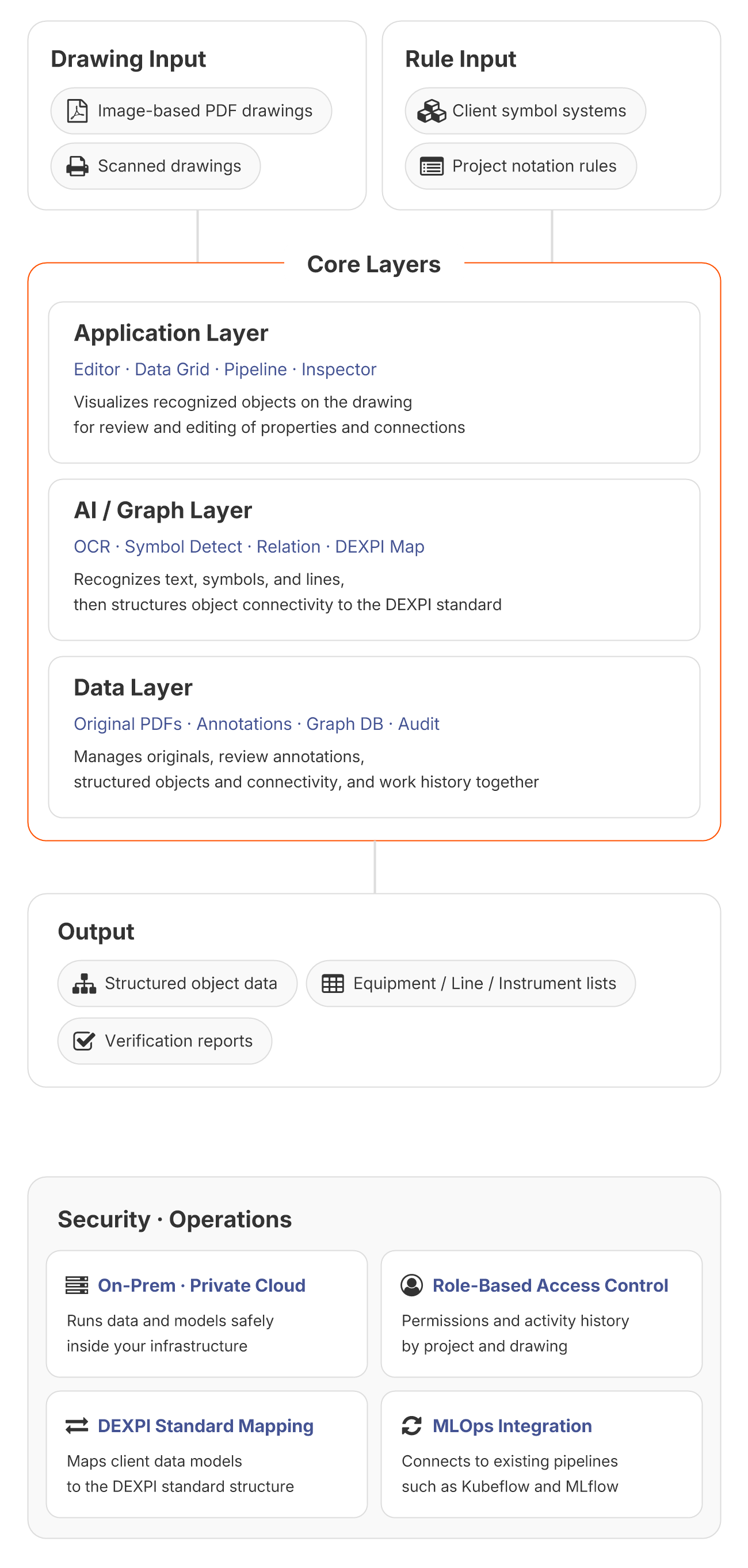
SURRO DrawAX architecture diagram: drawing and rule inputs are processed by three core layers - Application Layer (Editor, Data Grid, Pipeline, Inspector), AI/Graph Layer (OCR, Symbol Detect, Relation, DEXPI Map), and Data Layer (Original PDFs, Annotations, Graph DB, Audit) - delivering results within a secured operating environment SURRO DrawAX architecture diagram: drawing and rule inputs are processed by three core layers - Application Layer (Editor, Data Grid, Pipeline, Inspector), AI/Graph Layer (OCR, Symbol Detect, Relation, DEXPI Map), and Data Layer (Original PDFs, Annotations, Graph DB, Audit) - delivering results within a secured operating environment
Operation One workspace for rule registration,
automated inspection, and result review

Register your review rules once — SURRO DrawAX inspects entire drawings and surfaces only the results that need your attention.

Rule Registration
Select what to inspect on the drawing and register your review criteria.
Automated Inspection
Checks entire drawings against your rules, flagging violations with corrective guidance.
AI Result Review
Review AI results directly on the drawing and verify only what needs a closer look.
Key Features Nine capabilities
to read, inspect, and apply your drawings

SURRO DrawAX reads drawings with AI, turns key information and connectivity into data, automates inspection, and generates the lists and reports you need.

AI Drawing Recognition
Drawing Info Extraction
Extracts drawing numbers, Rev, and Tags for search and classification.
12 drawing-specialized AI models
Object Recognition
Detects equipment, valves, instruments, and piping across your drawings.
95%+ recognition accuracy
Connectivity Structuring
Traces piping lines to build From-To connectivity between objects.
Automated Inspection
Shared Review Rules
Turns your lead engineer's criteria into rules the whole team uses.
Full-Coverage Inspection
Automatically checks every incoming drawing, without exception.
Inspection History
Records which rules were applied to each drawing.
Data Application & Management
List Generation
Generates Equipment, Line, and Valve Lists and exports MTO base data to Excel.
Markup & Reports
Adds review comments on drawings and shares inspection reports as PDF.
Access & Traceability
Controls access by project and drawing, and tracks review history and source location.
References Proven outcomes across
real drawing analysis environments

SURRO DrawAX validated its drawing recognition accuracy and automated review performance in a P&ID pilot project.

  • Company A

P&ID Drawing Recognition Automation
Converted P&ID drawing images into structured data and built a custom review system that inspects every new drawing automatically.

Object Recognition 95%+

Drawings Verified 2,500

Structured Objects 10,000+

P&ID Drawing Search

Rev Comparison

Automated Rule Checks

swipe